Features / Plan & eat

Your kitchen,
kept in the loop.

Know what you have, what needs attention, and what to buy next. A dynamic pantry connects your groceries to meal ideas, your food budget, and everyone shopping at home.

Real beta screens use a test profile. Pantry changes are reviewed or marked by you.

Built From Food smart pantry: pantry; test profile

Smart pantry · Real beta app screen

01 / Bring the shopping home

Stock it your way.
Check it before it saves.

Add groceries without rebuilding your kitchen list from scratch. Review the matches, untick anything incorrect, and confirm what belongs in your pantry.

Scan a grocery receipt.

The app reads food items, store, date, and prices, and is designed to skip non-food lines such as bags, cleaning items, coupons, and tax. Receipt abbreviations are turned into recognizable food names. Confirmed items are stocked with the purchase date and price.

Photograph a shelf or fridge.

A photo can identify visible foods and propose a list to check. Matches to existing items and proposed new items help you avoid duplicating the list.

Scan several barcodes.

Scan packaged items one after another, then review the results before adding them.

Or add something yourself.

Each area has its own Add box. Use it for a new item, a correction, or the groceries you prefer to enter by hand.

02 / A kitchen that stays current

Fridge. Freezer.
Pantry & counter.

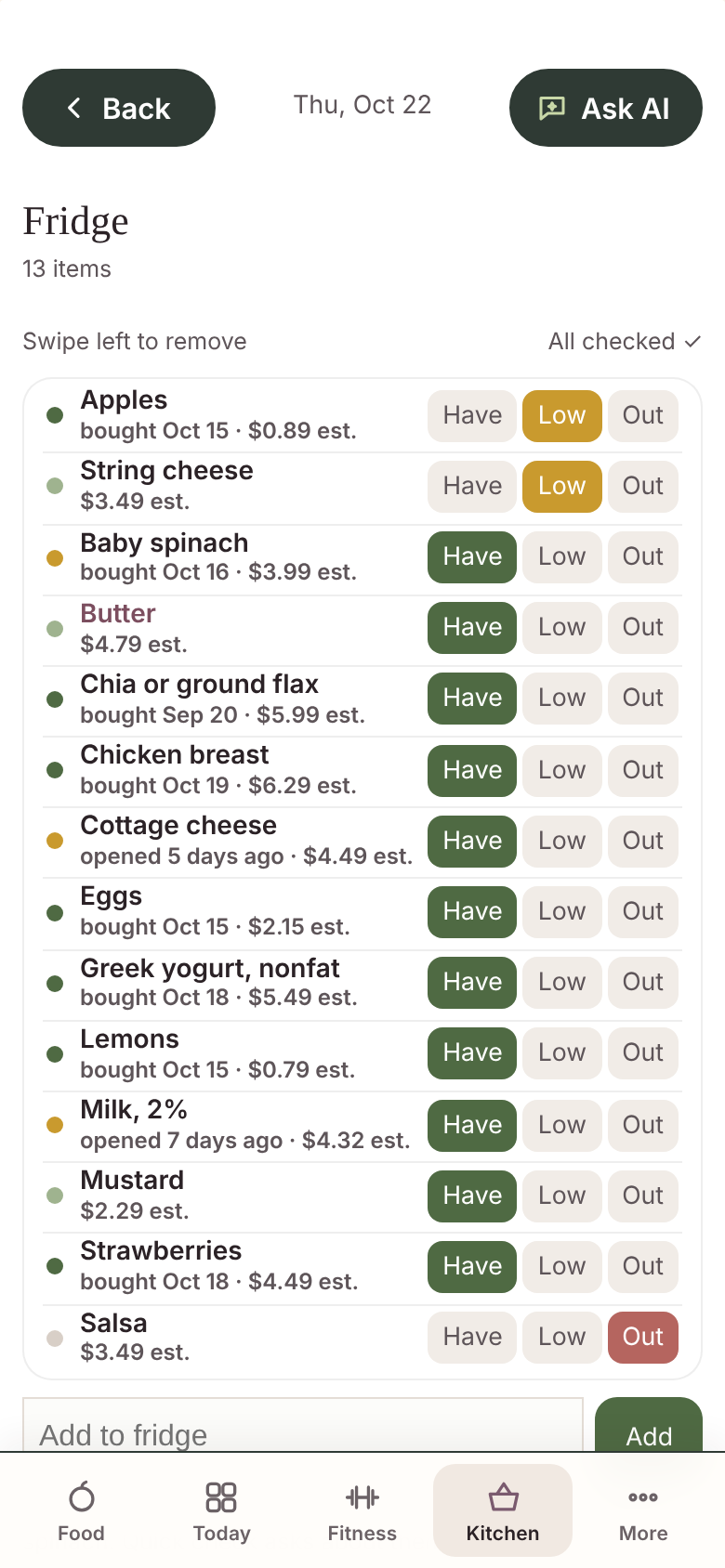
Keep foods where you actually store them. Each area shows its item count, and a tap changes an item between Have, Low, and Out.

  • About 40 starter staples across seven food groups.
  • Essentials help you see what is on hand and where the gaps are.
  • Remove a food or choose Not for me to personalize suggestions.
  • Every 14 days, Quick check revisits items you have not checked recently.

Starter groups include protein boosters, fiber and slow carbs, cereal, produce that keeps, healthy fats, flavor, and filling snacks.

Built From Food smart pantry: pantry fridge; test profile

Have / Low / Out · Quick check · Add

03 / What needs you?

The next useful action,
right at the top.

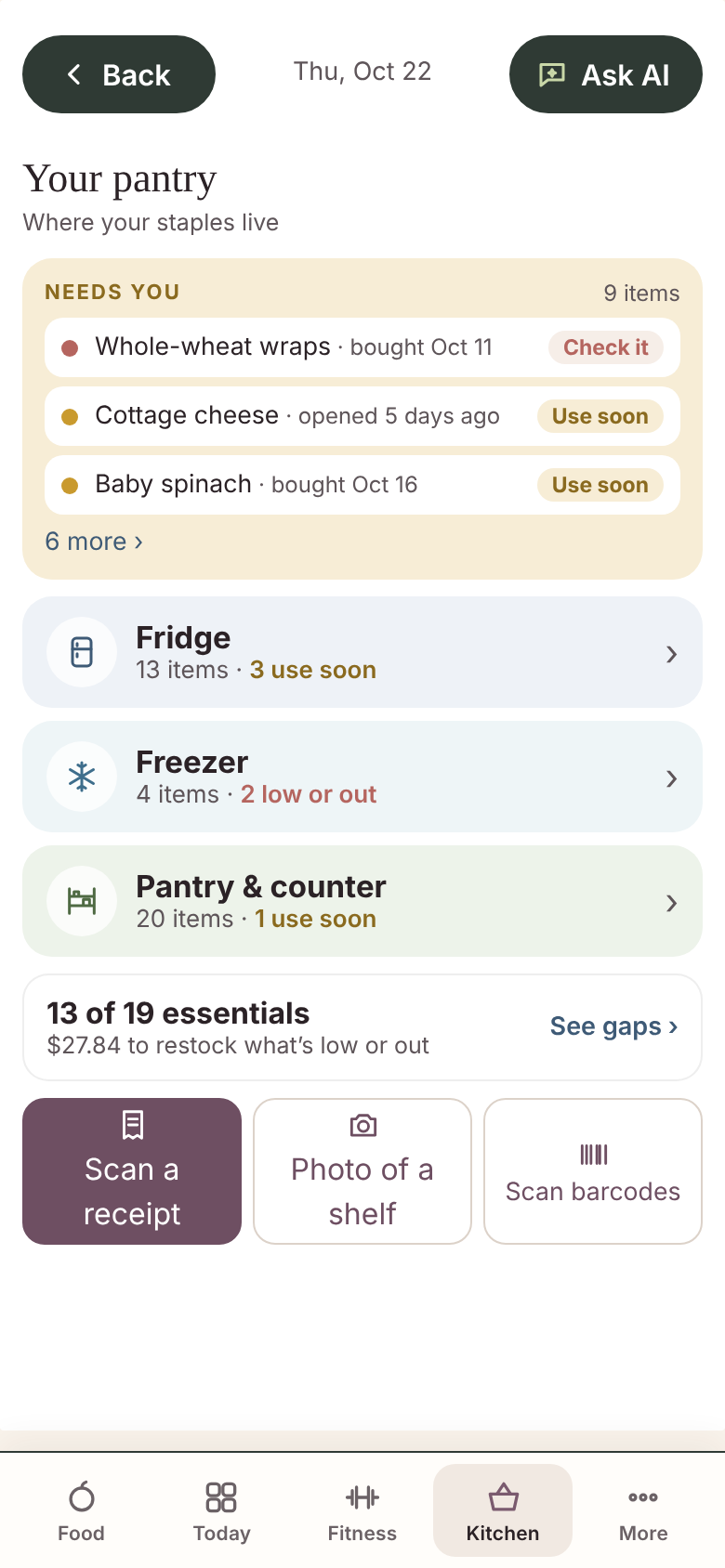
The Needs you card brings items to your attention, starting with those that need checking, followed by Use soon, Low, and Out.

01

Check it

Review foods past their usual keeping guide.

02

Use soon

See what is approaching its keeping guide.

03

Low

Restock what you are running short of.

04

Out

Know what is missing before you shop.

Before grocery day: use what you have.

The day before your chosen grocery day, Use it up this week highlights food to prioritize, with a 6 PM reminder. Food’s Today view can lead with ideas using those ingredients.

04 / Keep the details useful

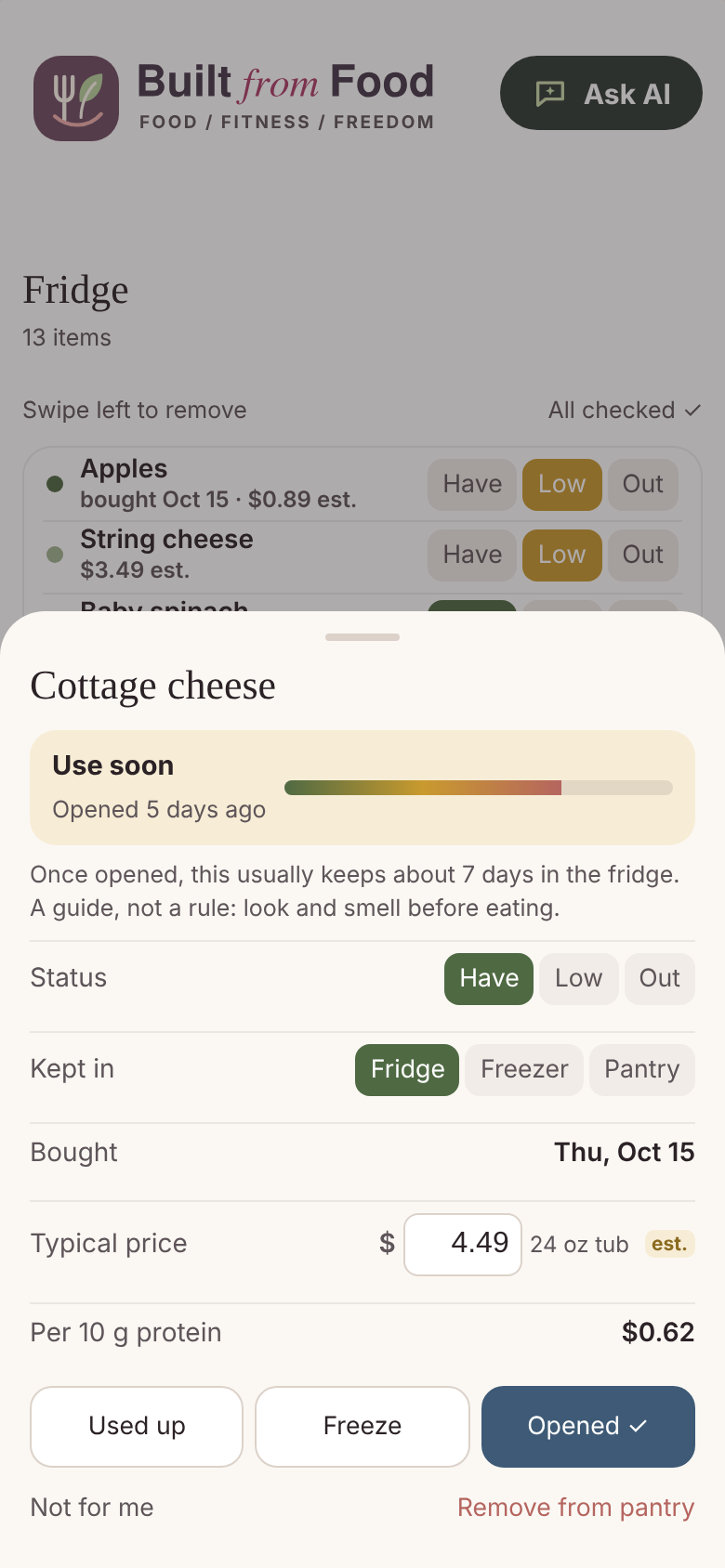
Opened it? Froze it?
Used it up?

One-tap actions update the item’s recorded state. Bought and opened dates, storage location, and typical keeping guides help you review what is in the kitchen.

  • Opened records when you started using it.
  • Freeze updates where it is stored and its keeping guide.
  • Used up marks the item for replenishment.
  • Each item keeps its price and storage information together.

Freshness indicators are estimates, not a food-safety assessment. Follow package storage and use-by instructions.

Built From Food smart pantry: pantry item; test profile

Item details · Price · Status · Storage

05 / Understand the value in your kitchen

What it costs.
What is missing.

Your prices, with estimates identified.

Receipt prices and amounts you enter replace the package-price estimates. Estimated values remain marked until you provide your own.

Compare protein value.

Protein foods can show the cost per 10 g of protein, helping you compare staples such as eggs, yogurt, and tuna.

See the restock total.

Low and Out items contribute to an estimated cost to replenish the pantry. It is a planning figure, rather than a guaranteed store total.

Find the essentials gaps.

The essentials score shows which starter essentials you have. See gaps groups the missing items and shows their prices and, where relevant, protein value.

06 / One change, a useful next step

Your shopping list
moves with your pantry.

Mark an item Low or Out and it joins the shopping list. Mark it Have again and that pantry restock entry comes off.

Try an example

Greek yogurt

Illustration only · These buttons do not change your app.

Shopping list

No yogurt restock needed.

Marked Have. The pantry restock entry is off the list.

The meal plan contributes, too.

Use this plan adds what you need for home meals. Planned restaurant meals stay off the grocery list.

One household, one shared list.

I'm at the store lets others know someone is shopping. Done shopping closes that trip, while the shared pantry and list help everyone coordinate.

07 / Turn what you have into what you eat

Put the pantry to work.

Your pantry feeds meal ideas, plans, costs, and coaching.

What can I make?

Get a dish idea from what is on hand, see missing ingredients, nutrition, and cost, or request another idea.

A useful protein suggestion.

When protein is short, Coach can suggest a staple you already have at home.

Ask AI has kitchen context.

Pantry information helps the guide suggest meals using ingredients you have.

Shop with the household.

Shared kitchen information gives meals and shopping a common starting point while personal goals remain individual.

The pantry loop

Shop & review your receipt → Stock the pantry → Check what needs attention → Choose meals → Build the shopping list → Shop together.

Invite-only beta

A more useful pantry.
A more purposeful next meal.

Explore how your kitchen, food choices, and shopping can work together.